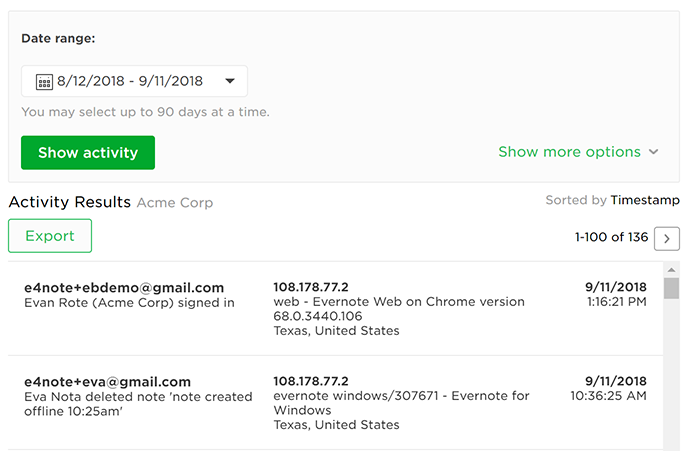
Activity History is a tool for Evernote Enterprise account admins to monitor changes occurring in their Evernote Enterprise accounts. It provides detailed logs of activity in an Evernote Enterprise account for the past 18 months, and reports can be generated containing up to 90 days worth of data at a time. Activity History is searchable and includes records of user actions like creating or deleting a note. It also includes the name and email address of the user who performed the action, along with IP address, approximate location, version of Evernote, and operating system used (where applicable).
How to access Activity History
- Go to the admin console. Note: You must be signed in as an Evernote Enterprise account admin to access this page.
- In the left menu, under Security, select Activity history.
How to view, search, and export Activity History
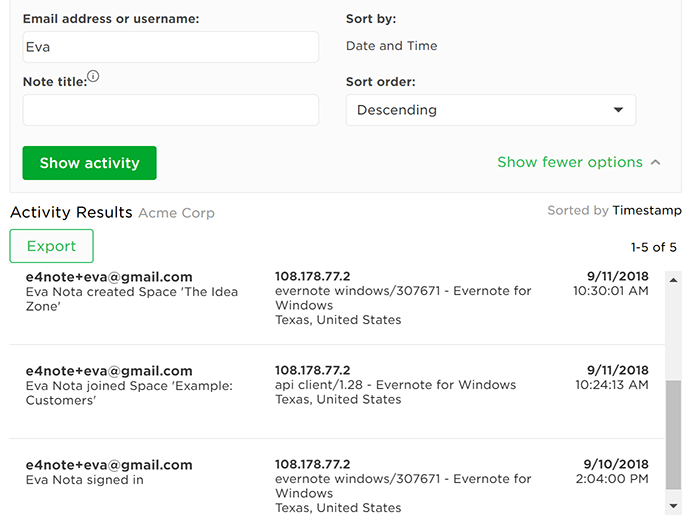
Choose a date range to see all available activity for that period, or to search the Activity History:
- Choose a dare range (Last 7 days, Last 30 days, or select a custom time frame)
- Search by user, activity, or location, or filter by member name or email.
After performing your search, click Export to download the Activity History to a CSV file that can be opened in your preferred spreadsheet app. This can be particularly useful if you need more advanced sorting and filtering options.
Frequently Asked Questions
What events are tracked and logged by Activity History?
| Subject | Events |
|---|---|
| Note | created, deleted, renamed, shared, unshared, moved, attached file |
| Notebook | created, removed, deleted, renamed, published, unpublished, shared, unshared, user joined |
| User | added, deactivated, signed in, signed out, sign-in failed, joined account, invited user |
| Admin | added user, deactivated user, changed user role, deleted note, deleted notebook |
| Space | created, permanently deleted, renamed, user joined, user left, updated visibility |
| Tag | created, permanently deleted, renamed, tagged a note, untagged a note |
| Misc | added seats to account, reset quota |
Is Activity History tracked when the user is offline?
Actions taken offline are recorded once the user reconnects and their account is synced. Timestamps for events that occur offline will be recorded as the time the account synced, rather than the time the event occurred. For example: if a user deletes a note while they are offline, the note deletion will not appear in the log until the user reconnects, and its associated timestamp will be the time of reconnection.
How soon after someone takes an action does it appear in Activity History?
Activity History is not meant to be a real-time monitoring system, however events typically appear in the history within 10-15 minutes. If the system is under heavy load, or the user is offline or has an unreliable internet connection, updates and search results may be delayed.
How far back can I see Activity History?
Evernote displays activity for the past 18 months, as far back as June 11, 2018. Data prior to June 11, 2018, is not available (this was the date Evernote enabled detailed Activity History tracking on our servers).
Who can see Activity History?
Evernote Enterprise account admins with accounts that have been updated have access to Activity History.
Can users track their own activities?
No, only Evernote Enterprise account admins can view the full Activity History logs for users in their organization’s Evernote Enterprise account. Individual users can view a list of recent logins (to their own account only) by viewing their individual access history.
Can I request that additional events be considered for inclusion in Activity History?
If you would like to request tracking of any event types not currently recorded by Activity History, get in touch with your Evernote Account Manager or contact support. Please provide a detailed description of the desired tracking functionality, and an explanation of how it would be helpful to your organization.
Keywords:
- server logs
- user history
- user activity tracking
- history logs
- audit log
- audit logging
- account logs
Updated